 Daniele
66d83358d9
Daniele
66d83358d9
The single-user notifications.md mechanism (a file in data/) died in the
multi-user move: assistant's prompt still pointed at it, but nothing read
it. Replace it with a memory note:

- event-triage injects user-memory/notifications.md verbatim on every
  pass and treats it as authoritative over its default heuristics
- a shared common/notifications.md fragment, included by assistant, kid
  and project-coordinator, tells the chat agents to record preference
  requests there: one dated rule per bullet under a source heading or
  General, asking for the source when ambiguous
- docs/system-agents.md explains the steering to users

Skald Circle 🔥
⚠️ Active development — expect breaking changes. Things move fast.
This repository is a clone of git.skaldagent.net/dguiducci/Skald-Circle.
Website: skaldagent.net — install directly from the site. Binaries available for Linux ARM64, Linux x86-64, and macOS ARM64.
 |
Skald Circle is a private AI assistant for the whole family. It runs on hardware you own — a mini-PC, a NAS, a Raspberry Pi — and gives every member of the household their own assistant, their own private space, and a shared common ground to plan, remember and get things done together. No cloud account. No subscription feeding your conversations to someone else's servers. Your home, your data, your rules. |

Why a family assistant?
AI assistants are becoming personal: they read our email, remember our plans, help us think. But today's assistants are built for one person, locked inside someone else's cloud. A household doesn't work that way — some things are private, some things are shared, and some people need looking after.
Skald Circle is built around exactly that:
- Everyone gets their own space. Each family member has their own account, their own assistant, their own conversations and memory. Yours is yours.
- Some things belong to everyone. A shared family memory — the shopping list, the Wi-Fi password, "what was the name of that plumber?" — plus shared folders for documents and photos, with per-person read or read-write access.
- Privacy between adults is real. Your personal space is encrypted with your password. Nobody else — not even the family admin who runs the box — can read it through normal use of the system. And because the code is open and auditable, sneaking around would leave traces. That's an honest promise, not a magic one — see Privacy & security.
- Kids deserve an assistant parents can trust. This is our north star: assistants for children and vulnerable family members, with a simpler interface, carefully limited capabilities, and parents in the loop. Not surveillance by stealth — the child knows the rules, and real concerns reach a human, not a dashboard. See the road ahead.
What it does
💬 A chat that actually does things
Talk to your assistant like you would to any chat — then watch it act. It reads and writes files, runs commands in its sandbox, checks your calendar, drafts your email, searches the web, generates images. Attach photos and documents straight to the conversation, and interrupt it mid-work to change your mind.
Specialist sub-agents can be delegated a job — research, planning, writing — and report back. Slash commands (/model, /cost, your own) package repeated prompts into shortcuts.
🧠 Two memories: yours and ours
The assistant keeps notes in two clearly separated places:
- Private memory — what it learns about you: preferences, projects, context. Stored encrypted, for your assistant's eyes only.
- Shared memory — the household's common notebook, readable by the whole family. Writes here need a human approval, so nobody's assistant quietly pushes personal things into the family space.
Both are structured as a maintained wiki rather than an ever-growing pile of notes, following Andrej Karpathy's LLM wiki pattern: notes cross-reference each other, an index says where everything lives, and an append-only log records every change — so you can reconstruct how memory reached its current state, and undo it if something goes wrong.
Because a wiki nobody prunes rots, a weekly background pass re-reads each store and reports what has drifted: facts whose date has gone by, questions nobody ever confirmed, notes the index lost track of, duplicates that have started to disagree — and, in the shared store, anything private written where everyone can read it. It only ever reports: an automated guess about notes several people wrote is not allowed to edit them.
Both stores are full-text searchable, and the assistant manages them on its own.
🔌 Connectors & the Marketplace
Connectors give assistants hands: email, calendars, maps, web search and more — through an app-store-like Marketplace built into the UI.
The trust model is deliberate: only people decide what gets installed, never the AI. The admin browses the marketplace and adds vetted connectors to the family catalog; each member then activates the ones they want and signs in with their own account (Google sign-in with OAuth is built in — Gmail is the first). Shared, key-based services (like web search) can be enabled once for everyone. The marketplace feed is plain static files — point it at your own mirror and run fully offline.
🛡️ Safe by default
- Sandboxed actions. When the assistant runs a command, it happens inside a locked-down container that only sees that person's files and the folders shared with them — never the host machine, never a sibling's space.
- Approvals & inbox. Anything sensitive — shell commands, writes outside whitelisted paths — requires a human yes. Out of the house? Pending requests collect in a single Inbox you can clear from your phone.
- You choose where thinking happens. Works with OpenAI, Anthropic, OpenRouter, DeepSeek — or fully local models via Ollama / LM Studio, so conversations can literally never leave the house. Mix and match per agent, switch on the fly.
⏰ Routines & reminders
"Remind me every morning at 8 if it's going to rain." "Every Sunday, help me plan the week's meals." Scheduled jobs are created by simply asking — no crontab, no config files.
Separately, background agents run on their own without being asked: one watches the events your connectors receive and pings you only when something is worth the interruption; two more keep memory healthy. Each works on your own data and reports to you alone — the run history is personal, and even the admin sees only their own.
🎨 Voice & images
Send a voice message (transcribed locally via whisper.cpp or in the cloud), let the assistant talk back (local Kokoro/Orpheus, or ElevenLabs/OpenAI), and generate images — locally via ComfyUI or through cloud providers.
🌍 Speaks your language
The interface is translated (English, Italiano, Français), and each family member picks their own. The assistant itself chats in whatever language you use.
📱 Everywhere in the house
The web app runs on any browser, phone included — add it to your Home Screen to chat, approve requests and check the inbox. There's a companion iOS app (SkaldAgent/skald-ios), and a Telegram bridge if you prefer to chat from there.
📲 Native iOS app
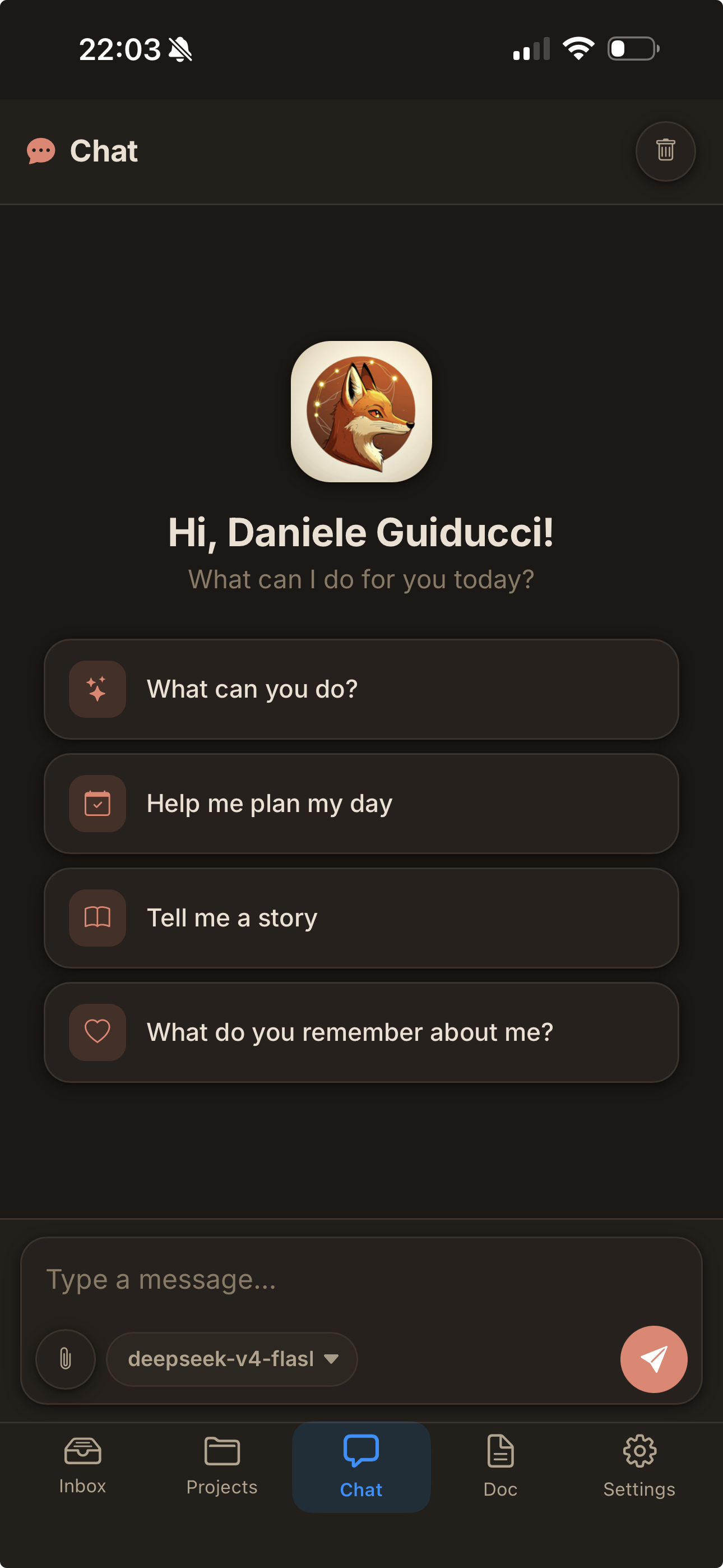
The native iOS companion app (SkaldAgent/skald-ios) connects to your server through a relay with end-to-end encryption — your messages and data are never visible to the relay. It supports Apple Push Notifications, so you never miss an approval request, a clarification, or a message from the assistant, even when the app is in the background.
Privacy & security — the honest version
Privacy products love the word "impossible". We prefer precise:
- Encrypted personal space. Each adult's database is encrypted at rest (SQLCipher), unlocked by a key derived from their password (Argon2id, memory-hard). The key lives only in RAM, from first login until the box restarts — a rebooted machine means everyone's space is sealed again until they sign in.
- Who we're defending against. Our threat model is the tempted admin: the family member who owns the box and, in a moment of mistrust, might be tempted to peek. Against them, your encrypted space is as strong as your password plus a deliberately expensive key derivation. We do not claim to stop a forensic attacker who owns the hardware — no honest software can.
- What's not hidden from the admin. Files on disk (documents, photos, downloads) live on the shared box in the clear, because the assistant's tools need to work on them — they're isolated from other family members, not from the person who runs the machine. Your notes, chats and memories are the private part; your files are on the family computer, like files on any family computer.
- Shared is shared. The family memory is readable by all members by design — that's its job.
- Open and verifiable. Everything is open source, so the promise above is checkable — and a tampered build would be detectable. We claim transparent, verifiable privacy, never "mathematically impossible".
For the most sensitive conversations, pair this with a local model and nothing leaves the house at all: that's a technical guarantee, not a policy one.
The road ahead
The multi-user foundation — accounts, roles, encrypted spaces, shared memory and folders, the connector marketplace — is built and in daily use. Next, the foundation grows toward the people who need the most care:
- Supervised accounts for children. Roles are already data, not code: a "kids" profile is a configuration — simplified interface (already available), restricted tools, no actions toward the outside world, and activity readable by a parent, who is their data controller. As they grow, the account grows with them — more autonomy, eventually a private encrypted space of their own.
- A safety net, done with care. An assistant a child confides in must know when to reach for a human. The principle: the child knows the safety rule ("what you tell me stays between us, unless I'm worried you might get hurt — then I tell someone who loves you"), thresholds stay high, and alerts carry concern and urgency to a parent, not transcripts. This is the feature we hold to the highest bar of care.
- More sign-in connectors (Calendar, Drive and beyond), richer shared-folder management, and polish everywhere.
Getting started
Requirements (macOS / Linux):
- Docker — used to sandbox the assistant's actions, one container per family member. Must be running before the app starts.
- Rust — to build the binary (
curl --proto '=https' --tlsv1.2 -sSf https://sh.rustup.rs | sh, orbrew install ruston macOS). - Python (optional) — some connectors are Python-based; a virtualenv is created automatically on first run.
./build.sh   # build the app (release binary)
./run.sh     # first-run setup, then start
On first launch a short wizard creates the family admin account. Then open http://localhost:9000, sign in, and add at least one LLM provider + model in the Models Hub — credentials are managed entirely from the web UI. Invite the rest of the family from the Users page.
Meant to run as a background service on an always-on machine (a mini-server, a spare box on the LAN): run.sh supervises the process and restarts it on demand, so the assistant is reachable from every device in the house.
Status
This is a personal project, actively used every day by its author's household. It's not a polished product — it's a living system that changes as we need it to. Breaking changes happen; the schema may shift (greenfield, no migrations yet). If you try it and something breaks, open an issue — but expect rough edges. That said: it works, it helps, and it's only getting better.
Built with Rust, Tokio, Axum, SQLite, and a lot of coffee. Rust was a deliberate choice: a single compact binary that runs comfortably on a Raspberry Pi or a low-power NAS — the kind of hardware already on 24/7 at home. The goal is an assistant that lives in your house, including the smallest machine you own.